问题现象:启用HA失败,报错“Setting desired image spec for cluster failed”
在配置VMware vSphere High Availability HA高可用时,有机会遇到以下失败情况:
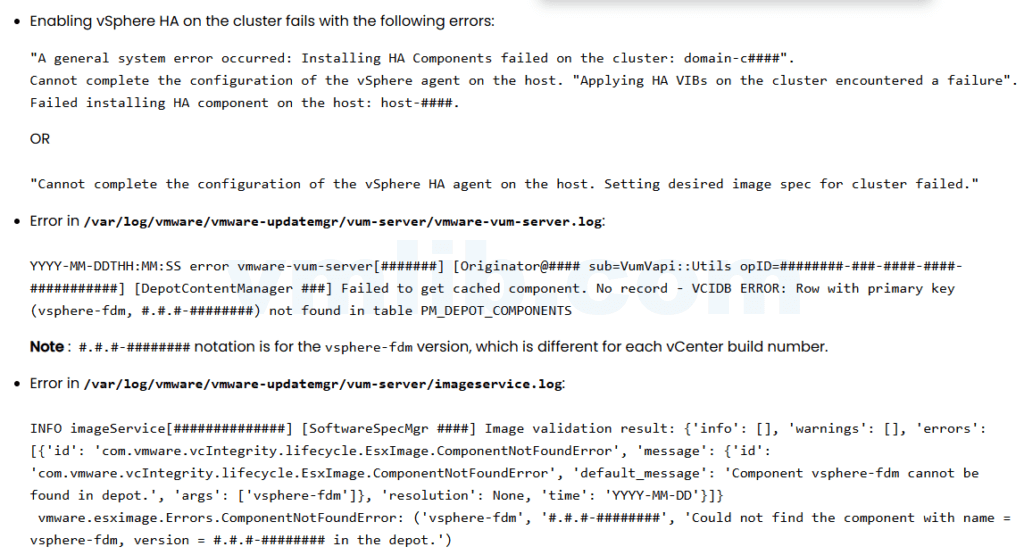
- vSphere HA 无法完成主机代理配置
- 报错信息包括:
- Cannot complete the configuration of the vSphere HA agent on the host
- Setting desired image spec for cluster failed
- Applying HA VIBs on the cluster encountered a failure
- “Cannot complete the configuration of the vSphere HA agent on the host. Setting desired image spec for cluster failed” error occurs when configuring vSphere HA on an image-based cluster.
- vmware-updatemgr 日志中显示:
Component vsphere-fdm cannot be found in depot - vCenter UI 验证集群镜像时报错 Image Validation Failed
- 核心日志
/var/core/core.updatemgr-worker.*中生成异常文件
受影响的主机通常存在 旧版本的 vsphere-fdm agent,vCenter 在启用 HA 时无法从 Update Manager 数据库(PM_DEPOT_COMPONENTS)获取所需组件,导致 HA 启用流程中断。
根本原因:vCenter更新后VCDB缓存缺失,fdm VIB冲突
问题的核心原因是:
- vCenter 更新或升级后,Update Manager 的数据库 VCDB 中的 pm_software_desired_states 和 pm_software_compliances 表无法正确缓存 vsphere-fdm 组件
- fdm VIB 被同时注册为独立组件和 solution-managed 组件,导致 HA 启用逻辑冲突
- 如果集群级别进行镜像验证,会触发 ComponentNotFoundError
- 核心问题并非 ESXi 主机故障,而是 vCenter Update Manager 数据库中记录不一致或缺失
可以通过命令 esxcli software vib list | grep -i fdm 确认主机端 vsphere-fdm 版本是否匹配 vCenter build。版本不一致会导致 HA 启用失败。
解决方法:清理VCDB冲突记录,重新生成集群镜像
参考下面的解决步骤:
- 快照保护:对vCenter VM做一个快照(尤其在多 vCenter 环境下,ELM 中需全量快照)
- SSH登录vCenter,启用shell并停止 Update Manager 服务:
service-control –stop vmware-updatemgr - 访问 Update Manager 数据库: su updatemgr -s /bin/bash
psql -U vumuser -d VCDB - 清理冲突记录:
- 全集群异常: DELETE FROM pm_software_compliances;
DELETE FROM pm_software_desired_states; - 单集群异常,需指定 cluster domain ID: DELETE FROM pm_software_compliances where desired_state_id in (select desired_state_id from pm_software_desired_states where entity_id=’domain-c####’);
DELETE FROM pm_software_desired_states where entity_id=’domain-c####’;
- 全集群异常: DELETE FROM pm_software_compliances;
- 退出数据库,重启 Update Manager 服务: \q
service-control –start vmware-updatemgr - 重新生成集群镜像,参考 vSphere Lifecycle Manager UI
- NSX-T 环境:若缺少 NSX solution,需通过 CLI 重新注册: dcli com vmware esx settings clusters software solutions set-task –cluster <cluster-id> –solution com.vmware.nsxt –version <version-number> –components ‘[{“component”:”nsx-lcp-bundle”}]’
- 重新启用 vSphere HA,验证 HA 代理配置成功
清理 VCDB 缓存和冲突后,HA 启用成功率大幅提升,vCenter 日志不再报ComponentNotFoundError。
具体参考官网KB https://knowledge.broadcom.com/external/article?articleNumber=384913


 VM技术助理