故障场景与现象分析
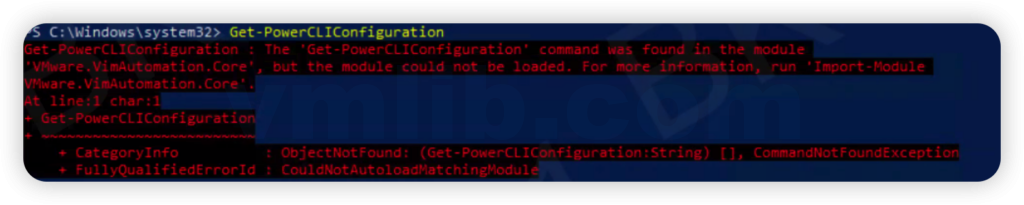
在使用 PowerCLI 13.3 进行 VMware 自动化管理时,你是否遇到过这种情况?在 PowerShell 5.1 环境下,运行 Get-PowerCLIConfiguration 命令时,会报错说找不到 VMware.VimAutomation.Core 模块。这个问题会导致 PowerCLI 无法正常使用,给自动化运维工作带来不便。
典型错误信息
Get-PowerCLIConfiguration : The term 'Get-PowerCLIConfiguration' is not recognized as the name of a cmdlet, function, script file, or operable program.
Check the spelling of the name, or if a path was included, verify that the path is correct and try again.
Or
Get-PowerCLIConfiguration : Could not load file or assembly 'VMware.VimAutomation.Core' or one of its dependencies.
根本原因分析
根据 VMware 官方解释,这个问题的原因非常明确:
PowerCLI 13.3 与 PowerShell 5.1 存在兼容性问题,即使它们在官方的兼容性列表中。这个问题主要是由于 PowerCLI 13.3 中使用了一些在 PowerShell 5.1 中不完全支持的功能。
兼容性说明
-
- PowerCLI 13.3 官方声明支持 PowerShell 5.1 和 PowerShell 7.x
- 但在实际使用中,PowerShell 5.1 会出现 VMware.VimAutomation.Core 模块找不到的错误
- PowerShell 7.x 版本完全兼容 PowerCLI 13.3
解决方案
方案一:升级到 PowerShell 7.x(推荐)
这是官方推荐的解决方案,也是最彻底的解决方法:
1. 从 Microsoft 官方网站下载 PowerShell 7.x 安装包
2. 在系统上安装 PowerShell 7.x(可以与 PowerShell 5.1 共存)
3. 打开 PowerShell 7.x(开始菜单中通常标为“Windows PowerShell 7”)
4. 在 PowerShell 7.x 中重新安装 PowerCLI 13.3:
Install-Module -Name VMware.PowerCLI -Scope CurrentUser -AllowClobber5. 验证安装:
Get-PowerCLIConfiguration方案二:降级 PowerCLI 版本
如果升级 PowerShell 版本不可行,可以考虑降级 PowerCLI 到与 PowerShell 5.1 完全兼容的版本:
1. 首先卸载当前的 PowerCLI 13.3:
Uninstall-Module -Name VMware.PowerCLI -AllVersions -Force2. 安装与 PowerShell 5.1 完全兼容的 PowerCLI 版本(如 13.2 或更低版本):
Install-Module -Name VMware.PowerCLI -RequiredVersion 13.2 -Scope CurrentUser -AllowClobber3. 验证安装:
Get-PowerCLIConfiguration验证与测试
验证步骤
1. 确保 PowerShell 版本符合要求
2. 重新安装 PowerCLI 或降级到兼容版本
3. 运行 Get-PowerCLIConfiguration 命令验证
4. 测试连接到 vCenter Server 以确保功能正常
常见问题排查
1. 如果升级到 PowerShell 7.x 后仍有问题,尝试完全卸载并重新安装 PowerCLI
2. 确保以管理员身份运行 PowerShell
3. 检查 Internet 连接是否正常,以便能够下载模块
4. 如果使用代理,确保 PowerShell 的代理设置正确
预防措施
为了避免类似问题的发生,建议:
1. 查看官方兼容性列表:在安装 PowerCLI 之前,先查看 VMware 官方的 PowerCLI 兼容性列表
2. 使用 PowerShell 7.x:对于新部署,推荐使用 PowerShell 7.x 版本
3. 定期检查更新:关注 VMware PowerCLI 的更新,及时了解兼容性信息
4. 测试环境验证:在生产环境部署前,先在测试环境中进行验证
运维经验总结
PowerCLI 是 VMware 自动化管理的核心工具,但版本兼容性问题可能会给运维工作带来困难。在处理这种问题时,建议:
1. 首先检查 PowerCLI 和 PowerShell 的版本组合
2. 参考官方 KB 和文档,获取准确的兼容性信息
3. 根据实际情况选择升级 PowerShell 或降级 PowerCLI
4. 在测试环境中验证解决方案,确保不会影响生产系统
通过遵循这些原则,你可以更好地管理 PowerCLI 的版本兼容性,确保自动化运维工作的顺利进行。
相关资源
- [VMware PowerCLI 官方文档](https://developer.vmware.com/docs/powercli/latest/)
- [PowerCLI 安装指南](https://developer.vmware.com/docs/powercli/latest/installing-powercli/)
- [PowerShell 7.x 下载页面](https://learn.microsoft.com/zh-cn/powershell/scripting/install/installing-powershell)
通过以上方法,你可以快速解决 PowerCLI 13.3 与 PowerShell 5.1 的兼容性问题,恢复 PowerCLI 的正常功能。
Reference: VMware KB 421383


 VM技术助理