TPM Alert After Installing ESXi 8.0 on Dell Technologies PowerEdge R760

Dell R760安装ESXi 8.0出现TPM告警的原因与解决思路

【Issue Overview】

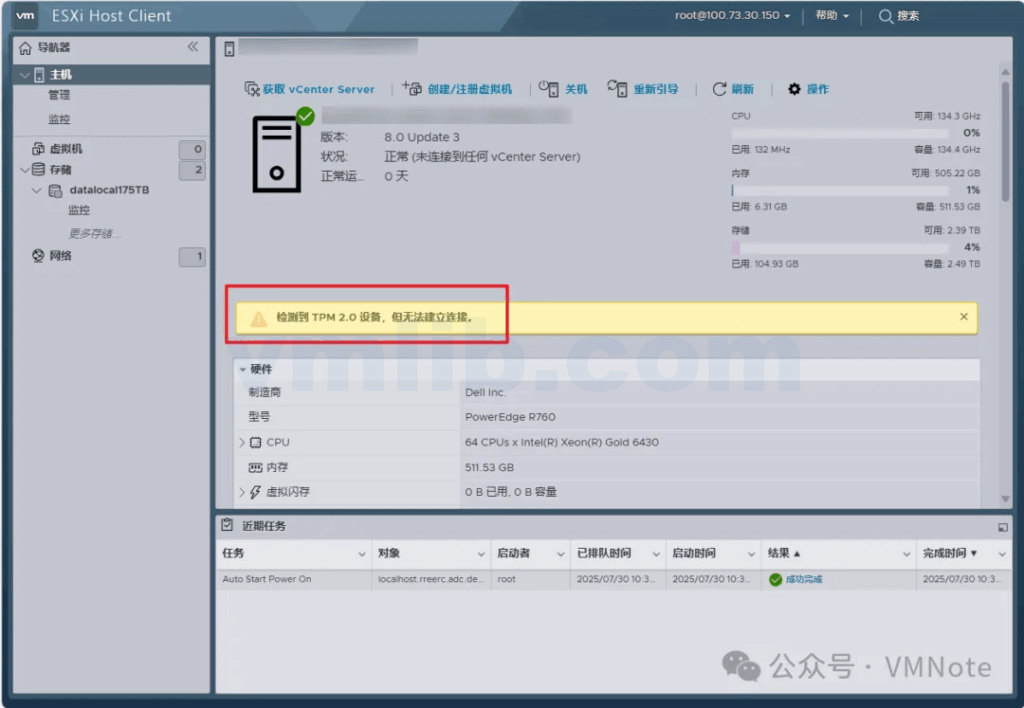
The customer reported that after installing VMware ESXi 8.0 U3 on a Dell R760 server, a TPM-related alert appeared when accessing the ESXi Host Client.

A TPM 2.0 device was detected, but a connection cannot be established.

TPM 2.0 device detected but a connection cannot be established.
【Troubleshooting Analysis】

(1) Checked the server hardware logs and confirmed there were no hardware errors. The TPM was properly detected and remained enabled.
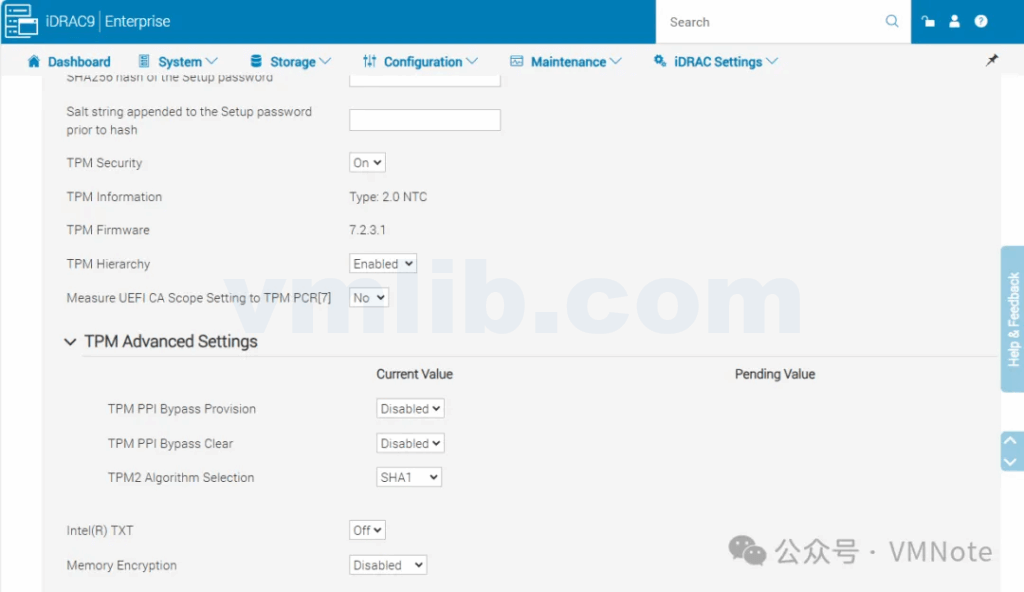
(2) Referred to Broadcom / VMware KB 393506 to verify TPM configuration and found that the current TPM hashing algorithm was set to SHA1, which does not meet the system requirements.

https://knowledge.broadcom.com/external/article/393506/enable-tpm-on-esxi.html

【Solution】

(1) Put the ESXi host into Maintenance Mode.

(2) Change the TPM algorithm from SHA1 to SHA256.
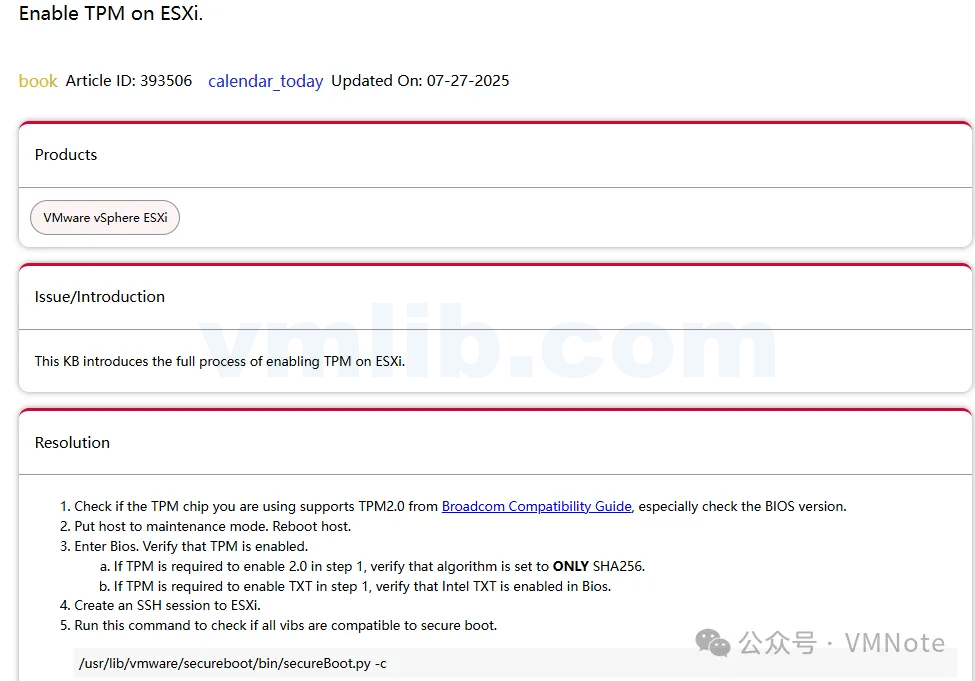
(3) Reboot the server and confirm the issue is resolved.

Summary

In an ESXi 8.0 environment, a TPM alert does not necessarily indicate a hardware failure. In most cases, it is caused by a mismatch between the TPM hashing algorithm and the platform’s security requirements. In practice, simply verifying the TPM status, switching the algorithm from SHA1 to SHA256, and performing the change while the host is in Maintenance Mode will clear the alert. For users planning or already deploying ESXi 8.0, understanding TPM compatibility and configuration requirements in advance can help avoid unnecessary troubleshooting and improve both the stability and security of the virtualization platform.

有VM问题需要协助?

免费试用VMware技术助理(已接Deepseek)!即时解答VM难题

→ 🤖VM技术助理

解析和诊断各类vCenter错误,ESXi日志,虚拟机vmware.log

→ 📕VMware日志分析器

图书推介 - 京东自营

24小时热门

还有更多VMware问题?

免费试下我们的VMware技术助理(已接Deepseek)!即时解答VM难题 → 🤖VM技术助理

试试 📕VMware日志分析器 免费诊断各类vCenter错误,ESXi日志,虚拟机vmware.log等等

########

扫码加入VM资源共享交流微信群(请备注加群

需要协助?或者只是想技术交流一下,直接联系我们!

推荐更多

Dell R760安装ESXi 8.0出现TPM告警的原因与解决思路
how-to

TPM Alert After Installing ESXi 8.0 on Dell Technologies PowerEdge R760

After deploying ESXi 8.0 on a Dell R760, you may see a TPM 2.0 connection warning even though the hardware is healthy. This guide explains the real cause — an unsupported SHA1 hashing algorithm — and walks through checking logs, updating TPM to SHA256, and clearing the alert safely in Maintenance Mode.

VMware vSphere等产品非永久许可过期和试用期到期会出现什么问题?
what-is

What happens when non-perpetual VMware vSphere licenses expire or trial periods end?

When a VMware vSphere product like ESXi, vCenter Server, or vSAN uses a non-perpetual license, serious functional limitations can occur once the 60-day trial or subscription expires. From host disconnections to being unable to power on VMs or add storage, the impact can be critical. This article explains what to expect and how to prepare before your VMware license expires.

如何收集VMware ESXi的日志包?(三种方法详解)
how-to

How to Collect VMware ESXi Log Bundles? (Detailed Explanation of Three Methods)

Logs are essential for diagnosing and troubleshooting issues in VMware ESXi environments. Whether you’re facing host performance problems, VM crashes, or storage connection failures, collecting a complete log bundle is the first step. This guide walks you through three reliable methods—via vSphere Client, ESXi Host Client, and command line—to quickly gather the necessary logs for analysis.

//omg10.com/4/9119499