

When ESXi cannot mount an NFS 4.1 datastore, the error message often points in the right direction but not far enough. Before changing storage design, I check the basic path first.
NFS 4.1 is not just “NFS with a newer number”. Server support, session behavior, authentication, and export options matter.
Confirm the NFS server really supports 4.1
Some storage systems support NFS 3 well but have limited or differently configured NFS 4.1 support. Check the export and the storage vendor documentation for the exact ESXi version.
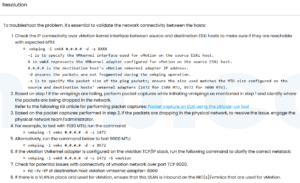
Check vmkernel connectivity
vmkping NFS_SERVER_IP
esxcli network ip interface list
esxcli network firewall ruleset list | grep nfs
If vmkping fails, do not spend time in vCenter datastore wizards. Fix routing, VLAN, MTU, or firewall first.
Check export permissions
Make sure the ESXi vmkernel IP is allowed on the NFS export. If the storage uses hostnames, confirm forward and reverse DNS. A simple DNS mismatch can make the export look correct while ESXi is denied.
Try NFS 3 only as a test
If NFS 3 mounts but NFS 4.1 does not, you have narrowed the problem. Do not treat that as the final fix unless your design accepts NFS 3 behavior.
Reference
Based on the Chinese article ESXi 無法掛載 NFS 4.1 卷的故障分析與解決方案, rewritten for English search traffic and practical troubleshooting.



 VM技术助理