
When a virtual machine is slow, it is tempting to blame VMware first. In practice, the slow VM is often a symptom. The cause may be CPU contention, storage latency, guest OS pressure, snapshots, or an application issue.
This is the checklist I use before making changes to the VM or rebooting the ESXi host.
Check CPU ready
High CPU usage inside the guest does not always mean the VM has enough physical CPU time. In vCenter, check CPU Ready and Co-Stop. Large multi-vCPU VMs can suffer more when the host is busy.
Check memory pressure
Look for ballooning, swapping, and guest OS paging. If the guest is paging heavily, adding vCPU will not help.
Check datastore latency
Storage latency is one of the most common causes of “VMware is slow” complaints.
esxtop
# press d for disk view
# check DAVG, KAVG, GAVG
If latency spikes match the complaint window, check backups, snapshots, array health, and other noisy VMs on the same datastore.
Check snapshots
Old or large snapshots can hurt performance and make backup windows worse. Check snapshot age and delta growth before doing consolidation during business hours.
Check the network path
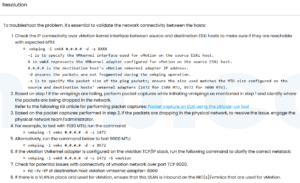
Packet loss, duplex mismatch, overloaded uplinks, or a bad physical NIC can look like an application problem. Compare the VM, port group, vmnic, and physical switch counters.
Reference
Based on the Chinese article 一些 VMware ESXi 虛擬機性能問題故障排除指南, rewritten for English search intent instead of line-by-line translation.



 VM技术助理